Output:
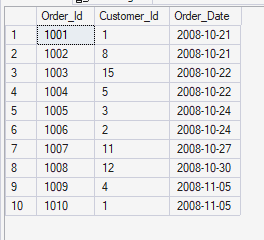
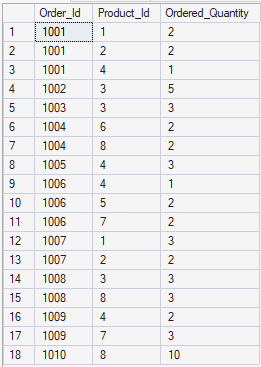
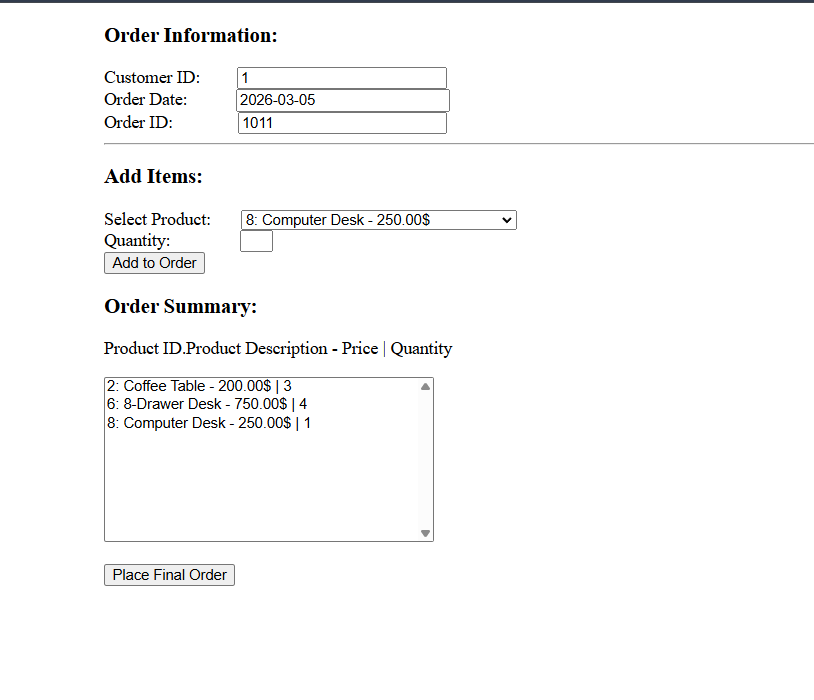
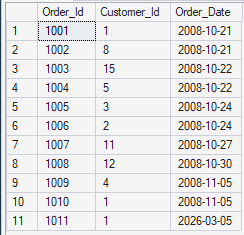
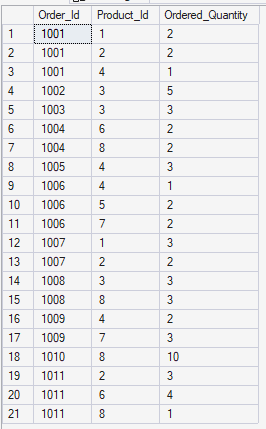
You are required to implement web form for Products Selection and Order Placement.
<%@ Page Language="VB" AutoEventWireup="false" CodeFile="Default.aspx.vb" Inherits="_Default" %>

<!DOCTYPE html>

<html xmlns="http://www.w3.org/1999/xhtml">
<head runat="server">
    <title>Order Placement</title>
    <style>
        form{
            padding-left:5%;
        }
    </style>
</head>
<body>
    <form id="form1" runat="server">
        <div class="Order-info">
            <h3>Order Information:</h3>
            <div class="text">
                <asp:Label ID="lblId" runat="server" Text="Customer ID: "></asp:Label>
                <asp:TextBox ID="txtCustomerID" runat="server" style="margin-left: 29px" Width="184px"></asp:TextBox>
            </div>
            <div class="text">
                <asp:Label ID="lblDate" runat="server" Text="Order Date: "></asp:Label>
                <asp:TextBox ID="txtOrderDate" runat="server" style="margin-left: 40px" Width="187px"></asp:TextBox>
            </div>
            <div class="text">
                <asp:Label ID="lblOrderID" runat="server" Text="Order ID: "></asp:Label>
                <asp:TextBox ID="txtOrderID" runat="server" style="margin-left: 55px" Width="183px"></asp:TextBox>
            </div>
        </div>

        <hr />

        <div class="iten-selection">
            <h3>Add Items:</h3>
            <div class="text">
                <asp:Label ID="lblProduct" runat="server" Text="Select Product:"></asp:Label>
                <asp:DropDownList ID="DropDownProducts" runat="server" style="margin-left: 23px" Width="251px"></asp:DropDownList>
            </div>

            <div class="text">
                <asp:Label ID="lblQuantity" runat="server" Text="Quantity: "></asp:Label>
                <asp:TextBox ID="txtQuantity" runat="server" style="margin-left: 59px" Width="23px"></asp:TextBox>
            </div>

            <asp:Button ID="AddButton" runat="server" Text="Add to Order" />
        </div>

        <div class="order-summary">
            <h3>Order Summary:</h3>
            <p>Product ID.Product Description - Price | Quantity</p>
            <asp:ListBox ID="lstOrderSummary" runat="server" Height="150px" Width="300px"></asp:ListBox>
            <br /><br />
            <asp:Button ID="btnPlaceFinalOrder" runat="server" Text="Place Final Order" />
        </div>
        <asp:Label ID="Status" runat="server" Text=""></asp:Label>
    </form>
</body>
</html>
Imports System.Data
Imports System.Data.SqlClient
Partial Class _Default
    Inherits System.Web.UI.Page


    Protected Sub DropDownProducts_SelectedIndexChanged(sender As Object, e As EventArgs) Handles DropDownProducts.SelectedIndexChanged

    End Sub

    Private Sub _Default_Load(sender As Object, e As EventArgs) Handles Me.Load
        If Not IsPostBack Then
            Dim currentDate As DateTime = DateTime.Now
            Dim formattedDate As String
            formattedDate = currentDate.ToString("yyyy-MM-dd")

            txtOrderDate.Text = formattedDate


            Dim conn As SqlConnection
            conn = New SqlConnection

            Dim constr As String
            'constr = "Data Source=WIN-3G30IJDBABE\SQLEXPRESS;Integrated Security=True;Trusted_Connection=True;Database=PVFC"
            constr = "workstation id=IAD_Lab_DB.mssql.somee.com;packet size=4096;user id=afzaalahmad_SQLLogin_1;pwd=5kvkluvzd7;data source=IAD_Lab_DB.mssql.somee.com;persist security info=False;initial catalog=IAD_Lab_DB;TrustServerCertificate=True"

            conn.ConnectionString = constr


            Dim cmd As SqlCommand = New SqlCommand
            cmd.Connection = conn


            cmd.CommandText = "SELECT Product_Id, PRODUCT_DESCRIPTION, STANDARD_PRICE FROM PRODUCT_T"

            Dim dr As SqlDataReader

            Try
                conn.Open()
                dr = cmd.ExecuteReader()

                While dr.Read()
                    Dim productId As String = dr("Product_Id").ToString()
                    Dim productName As String = dr("PRODUCT_DESCRIPTION").ToString()
                    Dim productprice As String = dr("STANDARD_PRICE").ToString()

                    Dim displayString As String = productId & ": " & productName & " - " & productprice & "$"

                    DropDownProducts.Items.Add(New ListItem(displayString))
                End While

                dr.Close()

            Catch ex As Exception
                Response.Write(ex.Message)
            Finally

                cmd.Dispose()
                conn.Close()
            End Try
        End If

    End Sub

    Protected Sub AddButton_Click(sender As Object, e As EventArgs) Handles AddButton.Click

        If String.IsNullOrWhiteSpace(txtQuantity.Text) Then
            Exit Sub
        End If

        Dim selectedProduct As String = DropDownProducts.SelectedItem.Text
        Dim finalSummary As String = selectedProduct & " | " & txtQuantity.Text
        lstOrderSummary.Items.Add(finalSummary)
        txtQuantity.Text = ""
    End Sub


    Protected Sub btnPlaceFinalOrder_Click(sender As Object, e As EventArgs) Handles btnPlaceFinalOrder.Click
        Dim currentOrderID As String = txtOrderID.Text
        Dim currentcustomerID As String = txtCustomerID.Text
        Dim currentOrderDate As String = txtOrderDate.Text

        Dim conn As New SqlConnection
        Dim constr As String
        'constr = "Data Source=WIN-3G30IJDBABE\SQLEXPRESS;Integrated Security=True;Trusted_Connection=True;Database=PVFC"
        constr = "workstation id=IAD_Lab_DB.mssql.somee.com;packet size=4096;user id=afzaalahmad_SQLLogin_1;pwd=5kvkluvzd7;data source=IAD_Lab_DB.mssql.somee.com;persist security info=False;initial catalog=IAD_Lab_DB;TrustServerCertificate=True"

        conn.ConnectionString = constr

        Dim cmd As SqlCommand = New SqlCommand
        cmd.Connection = conn

        cmd.CommandText = "INSERT INTO ORDER_T (ORDER_ID, CUSTOMER_ID, ORDER_DATE) VALUES "
        cmd.CommandText &= "(" & currentOrderID & ", "
        cmd.CommandText &= "'" & currentcustomerID & "' , "
        cmd.CommandText &= "'" & currentOrderDate & "')"


        Dim inserted As Integer = 0
        Try
            conn.Open()
            inserted = cmd.ExecuteNonQuery()
            If inserted = 1 Then
                Status.Text = inserted & "records added."
            Else
                Status.Text = "0 records added"
            End If

            For Each item As ListItem In lstOrderSummary.Items
                Dim productId As String = item.Text.Split(":"c)(0).Trim()
                Dim productQuantity As String = item.Text.Split("|"c)(1).Trim()

                cmd.CommandText = "INSERT INTO ORDER_LINE_T (ORDER_ID, PRODUCT_ID, ORDERED_QUANTITY) VALUES "
                cmd.CommandText &= "(" & currentOrderID & ", "
                cmd.CommandText &= productId & ", "
                cmd.CommandText &= productQuantity & ")"

                cmd.ExecuteNonQuery()
            Next

        Catch ex As Exception
            Status.Text = ex.Message
        Finally
            cmd.Dispose()
            conn.Close()
        End Try
    End Sub

End Class